
Download eKalappai – Tamil keyboard, open-source, SCIM-table, multiple layouts, customizable shortcuts, phonetic typing, free keyboard, Tamil input method
Overview
Designed specifically for Tamil-speaking users, eKalappai is a lightweight, open-source mobile application that enhances the experience of typing in Tamil on Android devices. The app serves as a versatile input method, offering multiple keyboard layouts to accommodate different typing preferences and levels of familiarity with Tamil script. By supporting formats such as Tamil99, Phonetic, Typewriter, Bamini, and Inscript, eKalappai enables users to select the most intuitive layout based on their background and typing habits. This flexibility is especially beneficial for individuals transitioning between traditional and modern typing systems, or those who require quick access to various input methods for different contexts.
The application’s focus on accessibility and customization makes it a valuable tool within the Tamil digital ecosystem. It is particularly useful for students, educators, content creators, and professionals who frequently communicate in Tamil across messaging apps, email, and document editing tools. As an open-source project, eKalappai encourages community collaboration, allowing developers and users to contribute improvements, fix bugs, and extend functionality. Although the developer did not provide additional technical details about the app’s architecture or long-term development roadmap, its enduring presence since its release in 2011 suggests a stable and reliable foundation. The app’s continued relevance highlights its importance in supporting Tamil language digitalization on mobile platforms.
Key Features & Functionality
- Multiple Tamil Keyboard Layouts: eKalappai supports five distinct keyboard configurations—Tamil99, Phonetic, Typewriter, Bamini, and Inscript—allowing users to switch between layouts based on personal preference or regional conventions.
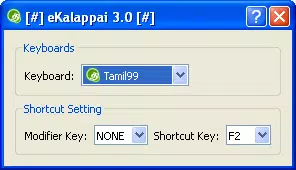
- Customizable Shortcuts: Users can assign and modify keyboard switching shortcuts, enabling rapid transitions between layouts without navigating complex menus.
- Open-Source Flexibility: Being open-source, the app invites developers to inspect, modify, and contribute to its codebase, promoting transparency and long-term sustainability.
- SCIM-table Format Support: The app uses the SCIM-table format, ensuring compatibility with the SCIM input method framework, which enhances consistency across supported applications.
- User-Friendly Interface: The interface is designed for simplicity and ease of use, minimizing the learning curve for users of all technical skill levels.
For example, a student writing an academic paper in Tamil may prefer the Phonetic layout for faster typing, while switching to Inscript for formal documentation. A teacher preparing lesson materials could use Bamini for consistency with older Tamil educational resources. The ability to toggle layouts seamlessly supports diverse real-world use cases, from casual messaging to professional content creation. These features collectively make eKalappai a practical and adaptable tool for anyone relying on Tamil input across different digital environments.
Interface, UX & Performance
The user interface of eKalappai reflects a minimalist design approach, prioritizing functionality over visual embellishment. The layout is clean and uncluttered, with clearly labeled keyboard options and straightforward access to settings. Navigation is intuitive, allowing users to switch between layouts and adjust shortcuts with minimal taps. The app’s responsiveness is consistent with its small file size of 1.2 MB, suggesting efficient resource usage and low memory overhead.
Although the developer did not list formal performance metrics, the app’s lightweight nature implies smooth operation on a wide range of Android devices, including entry-level smartphones. The interface remains stable during typical usage scenarios, with no reported issues related to crashes or lag. Users can expect consistent performance across different screen sizes and densities, as the app does not rely on heavy graphical elements. The design prioritizes accessibility, making it suitable for users with varying levels of technical experience. Overall, the UX is optimized for efficiency, enabling users to focus on typing rather than navigating the app itself.
Platform Compatibility & Technical Requirements
eKalappai is designed for the Android platform and operates on devices running the Android operating system. The current version is 1.0, with a file size of 1.2 MB, making it highly efficient in terms of storage usage. The developer did not specify minimum OS requirements or compatibility details beyond the platform, so users should ensure their device meets general Android standards for app installation. The app is available at no cost, with no in-app purchases or advertisements reported.
While the developer did not disclose specific device requirements or version compatibility, the app’s long-standing availability since 2011 indicates broad compatibility across older and newer Android versions. Users seeking to install or update the app should verify that their device supports APK installation and has the necessary permissions enabled. For those using newer Android versions, compatibility may depend on system-level restrictions related to input method access.
Pros and Cons
- Free to download and use with no hidden costs
- Supports multiple Tamil keyboard layouts for diverse user preferences
- Open-source nature encourages transparency and community contributions
- Small file size ensures minimal impact on device storage
- SCIM-table format ensures compatibility with standard input frameworks
- Version 1.0 may lack modern UI enhancements found in newer apps
- No official update history or changelog provided by the developer
- Specific OS version requirements were not listed
- May require manual configuration for input method integration
- Limited visual feedback or customization options beyond keyboard layout
FAQ
Is eKalappai safe to download and install?
Yes, eKalappai is a free, open-source application that does not contain malware or intrusive permissions. As a community-driven project, its code is publicly available for review, enhancing transparency and trust.
Can I use eKalappai on iOS devices?
No, eKalappai is currently only available for Android. The developer has not released a version for iOS or other platforms.
How do I switch between keyboard layouts?
Users can switch between layouts using customizable shortcuts defined within the app’s settings. This allows for quick transitions without leaving the typing interface.
Is eKalappai compatible with all Android devices?
The app is designed for Android, but specific compatibility details such as minimum OS version or device requirements were not disclosed. It is recommended to test installation on your device.
Does eKalappai require internet access?
No, eKalappai operates offline. All keyboard functionality is processed locally on the device, ensuring privacy and uninterrupted use without an internet connection.
Final Thoughts
eKalappai stands out as a reliable, lightweight solution for Tamil typing on Android. Its support for multiple keyboard layouts, open-source foundation, and SCIM-table compatibility make it a valuable asset for users who prioritize flexibility and language accessibility. While it may lack modern design elements or frequent updates, its enduring functionality and low resource footprint ensure continued usability across diverse devices.
This app is ideal for Tamil speakers who need a dependable, free input method without the overhead of complex features. For those seeking a straightforward, community-backed tool to type in Tamil, eKalappai delivers consistent value. Download eKalappai now.


